ARCQTYPE for Coaches

Turn your roster into a development system.

See roster progress, athlete records, ARCQTYPEs, and ARQ Scores through the same verified information athletes and families see. Put the roster on the field it plays and evaluate position decisions in context.

Coming soon, fall 2026.

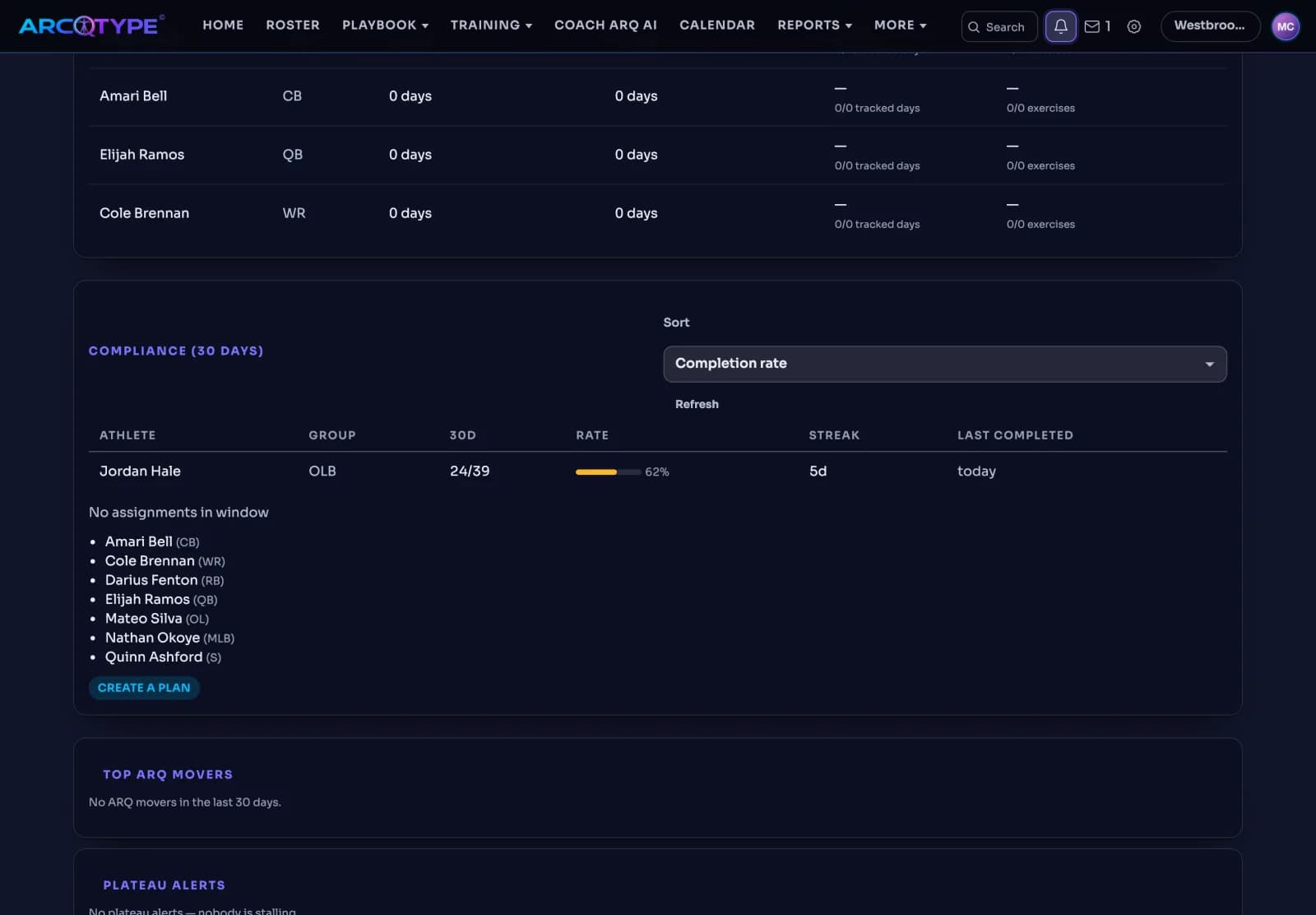
The Coach website Team page, 30-day compliance table: Jordan Hale, OLB, 24 of 39 assignments at 62 percent with a five-day streak and last completed today, and a list of athletes with no assignments in the window.
Coming soon, fall 2026.

Coach website · Team Intelligence

Comprehensive Roster Management

Monitor all prescribed training sessions and your team’s completed work. Track completion streaks, view the latest completed session or practice, and monitor each player’s individual progress and performance record.

  • Sort Compliance (30 days) by completion rate, streak, or last completed session.
  • Read the rate as logs against plans in the window, not coach-assigned plan adherence.
  • Compare training, nutrition, and physical-therapy activity signals.
  • Open athlete detail to inspect Log streak.
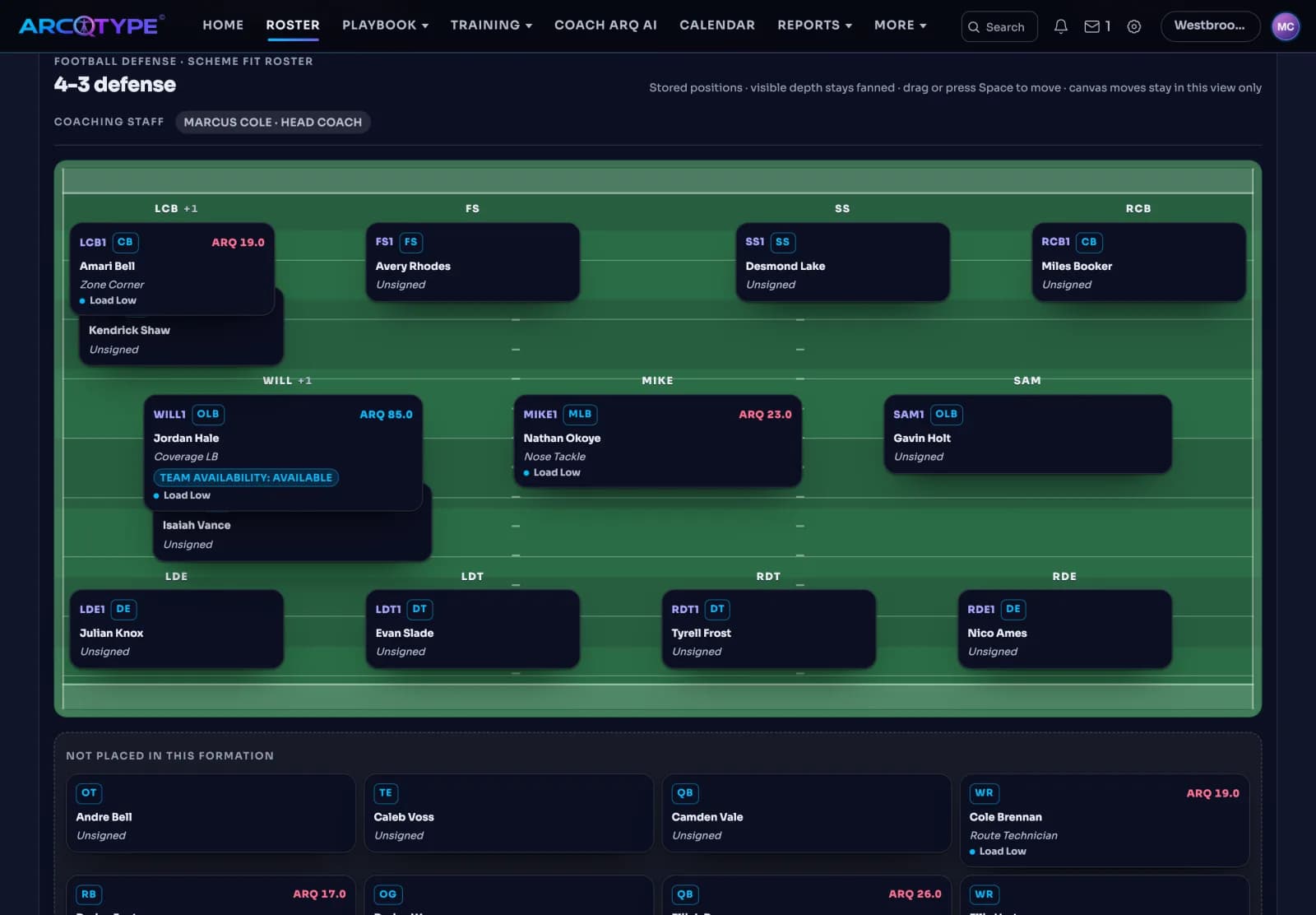
The Coach website Roster page with a 4-3 defense drawn on a football field. Each position holds an athlete card with position, ARCQTYPE, and ARQ Score; Jordan Hale sits at WILL as a Coverage LB with ARQ 85. Athletes not placed in the formation are listed below the field.
Coming soon, fall 2026.

Coach website · Sport-appropriate roster

See how players fit your scheme

Evaluate different player combinations, formations, and potential adjustments to build the right game plan for every opponent and situation. Archetype and current position score for every position on the field, court, or diamond.

  • See football players arranged on the formation.
  • View baseball players on the diamond.
  • Read available ARCQTYPE and ARQ Score beside roster context.
  • Switch between the field projection and A–Z roster.
How we verify
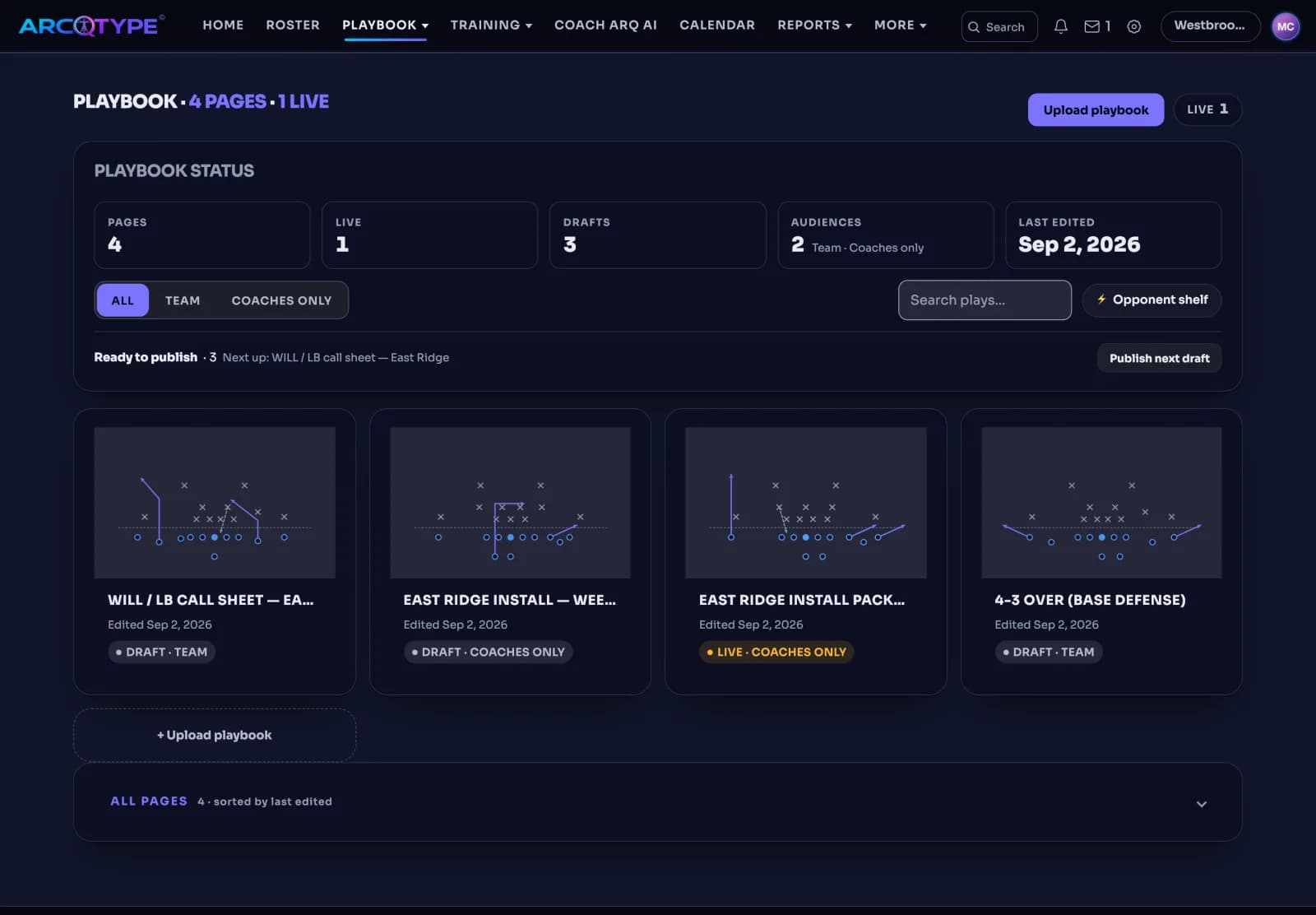
The Coach website Playbook page: four pages with one live, a status row for pages, live, drafts, audiences, and last edited, and a card for each page showing its audience and whether it is live or in draft.
Coming soon, fall 2026.

Coach website · Playbook, Training Studio, Reports

Deliver team communications and material

Publish playbooks, game plans, practice schedules, game time updates, and other team communications with direct delivery to athletes.

  • Review a playbook PDF’s extracted draft before publishing to your chosen audience.
  • Track Delivered, Opened, and Downloaded receipts by athlete.
  • Build team training blocks in Training Studio.
  • Generate team-operations reports with athlete names and health-derived signals excluded.

Coach website · Reviewed change

Coach ARQ AI keeps athletes moving

From personalized recommendations and instructional resources to workout reminders and progress tracking, Coach ARQ AI helps athletes stay engaged, accountable, and focused on continuous improvement.

  • Ask which athletes need a plan this week.
  • Request a scheme recommendation for your personnel.
  • Approve or dismiss a proposal in Decisions.
  • Revisit dated receipts for prior decisions.

Coach ARQ AI is ARCQTYPE’s built-in AI chatbot. It helps athletes organize plans, understand their information, and prepare approved updates, working alongside their human coach.

Coach website · Calendar and Messages

Coordinate staff and families

Keep team logistics connected to accepted guardians.

  • View the team clock beside your private coach calendar.
  • Import or export team calendar events.
  • Use an athlete’s shared thread with accepted guardians and active staff.
  • Keep family messages human-only, outside Coach ARQ AI’s context.

Coach website · Socials · Preview

Follow the roster’s work from a staff feed.

Socials on the Coach website shows your roster’s activity the way staff need it: a team feed, crew leaderboards for the roster, and achievements visible to staff — with one @handle per athlete, verified-only numbers, and privacy that defaults to private.

  • Team feed: completed workouts, verified PRs, and challenge results from the athletes on your roster, newest first, with likes and hashtags.
  • Crew leaderboards: standings for the crews and team groups on your roster, read from logged work, not self-reported totals.
  • Achievements visible to staff: a milestone an athlete earns shows to the staff on the team, beside the record it came from.
  • Verified-only numbers: a lift or PR shows a number only after ARCQTYPE has verified it; everything else reads Pending.
  • No reposts: a post stays with its author and is never re-shared into someone else’s feed, a staff feed included.
  • Private by default: an athlete’s activity reaches the staff feed only through the sharing the athlete, and for 13–17 a guardian, turns on.
How Socials works

Coach website · Team

Comprehensive Roster Management

Monitor all prescribed training sessions and your team’s completed work. Track completion streaks, view the latest completed session or practice, and monitor each player’s individual progress and performance record.

  • Sort the 30-day compliance table by completion rate, streak, or last completed session.
  • The rate counts logs against plans in the window, not coach-assigned plan adherence.
  • Athletes with no assignments in the window are listed separately, not scored as zero.
  • Training, nutrition, and physical-therapy signals sit side by side for each athlete.

Coach website · Roster

See how each player fits your scheme

Evaluate different player combinations, formations, and potential adjustments to build the right game plan for every opponent and situation. Archetype and current position score for every position on the field, court, or diamond.

  • Place each athlete at a position on the formation you run, such as a 4-3 defense.
  • Athletes not placed in the formation are listed below the field, ready to slot in.
  • Each card carries position, ARCQTYPE, and ARQ Score where the athlete has them.
  • Switch between the field projection and the A–Z roster.

Coach website · Playbook

Deliver team communications and material

Publish playbooks, game plans, practice schedules, game time updates, and other team communications with direct delivery to athletes.

  • Upload a playbook PDF and review the extracted draft before it goes live.
  • Choose the audience for each page; live pages and drafts are tracked separately.
  • See Delivered, Opened, and Downloaded by athlete.
  • Build team training blocks in Training Studio and publish them the same way.

Coach website · Decisions

How Coach ARQ AI helps keep your athletes moving forward

From personalized recommendations and instructional resources to workout reminders and progress tracking, Coach ARQ AI helps athletes stay engaged, accountable, and focused on continuous improvement.

  • Ask which athletes need a plan this week, or request a scheme recommendation for your personnel.
  • Approve or dismiss each proposal in Decisions; a dismissed proposal changes nothing.
  • Revisit dated receipts for prior decisions when the question comes back.
  • Family messages stay human-only, outside Coach ARQ AI’s context.

Coach access & pricing

Bring the staff into one shared view.

Public access opens in stages. Each program sees only its own team context.

Coach access$24 monthly · $249 annualpublic waitlist open
What are you interested in?

Joining the waitlist saves your email for Coach launch updates—it doesn’t create a program or open a roster.