ARCQTYPE for Trainers

Make every session count beyond the gym.

Schedule sessions and assign plans that flow into the athlete’s calendar and Pathway. Athletes and parents can see what is coming without maintaining separate schedules.

Coming soon, fall 2026.

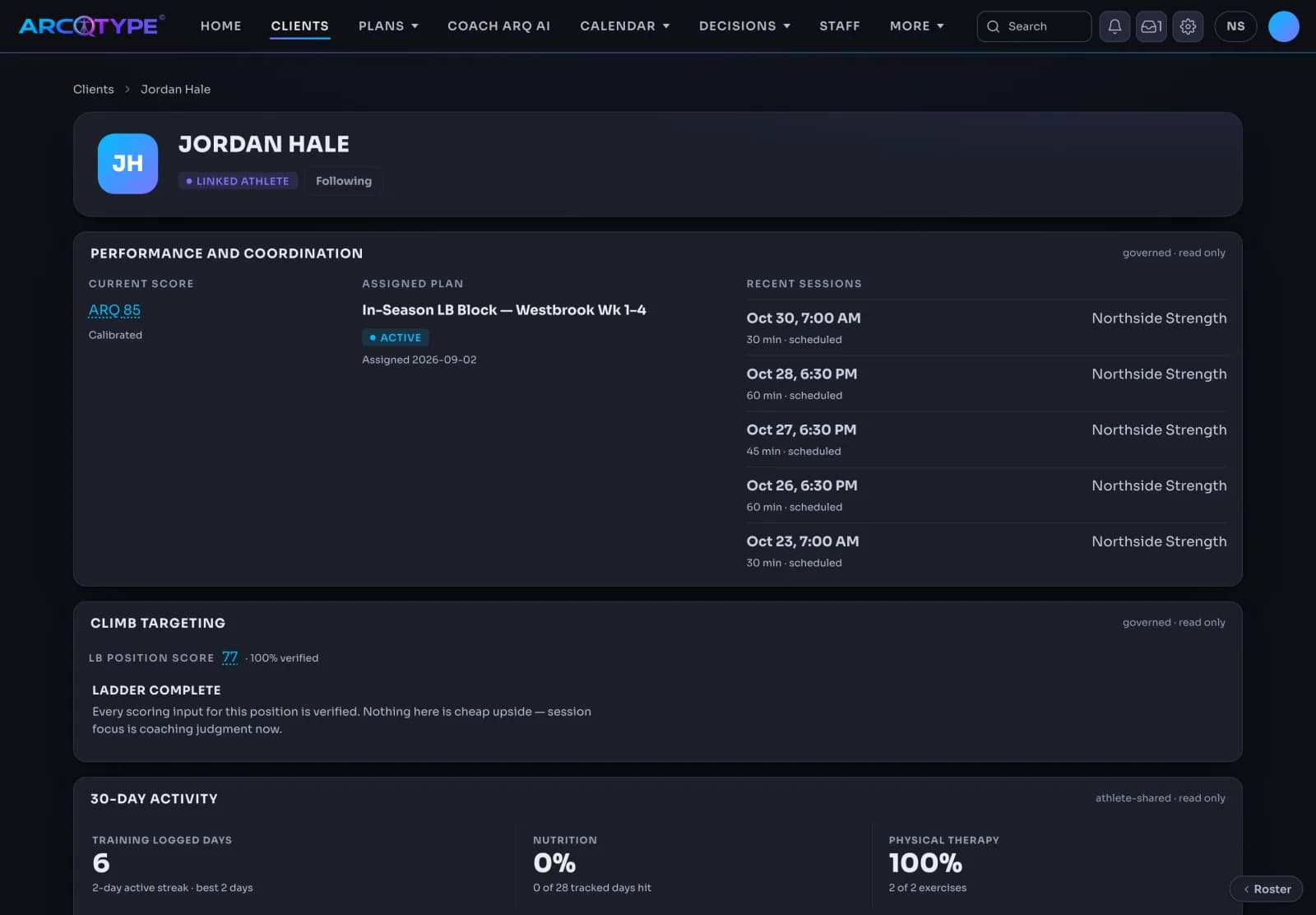
The Trainer website client page for Jordan Hale, a linked athlete: current ARQ 85 calibrated, the active assigned plan In-Season LB Block, a list of scheduled sessions at Northside Strength, LB Position Score 77 fully verified, and 30-day athlete-shared activity for training, nutrition, and physical therapy.
Coming soon, fall 2026.

Trainer website · Clients · 30-day activity

Read client training habits

Understand shared activity alongside your client’s assigned plan.

  • Check Training logged days with active and best streaks.
  • Read Nutrition and Physical therapy against their own denominators.
  • Compare shared activity with the assignment without treating it as plan-specific adherence.
  • Distinguish consent-hidden data from zero activity.
How we verify
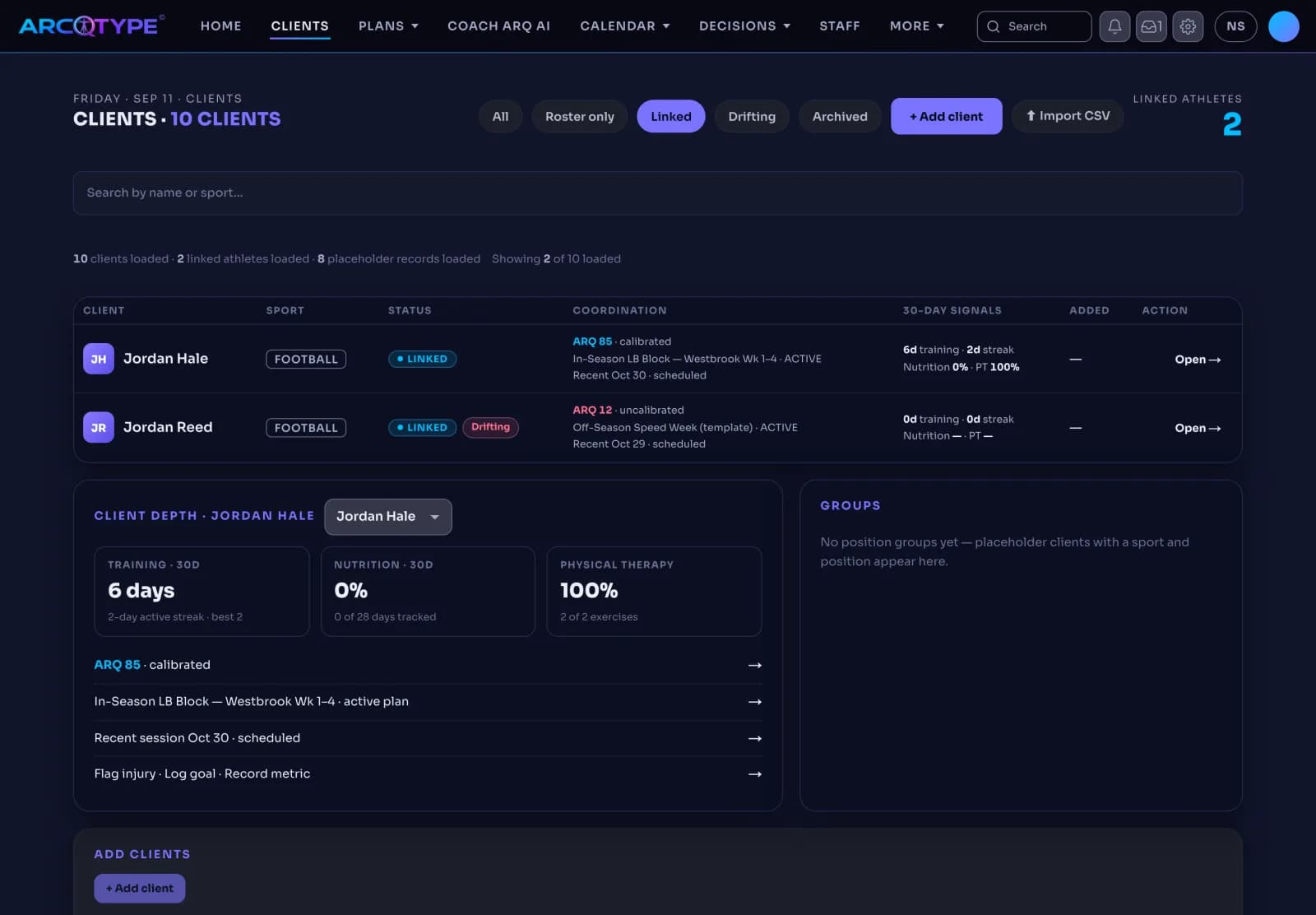
The Trainer website Clients list filtered to linked athletes: Jordan Hale and Jordan Reed with sport, status, ARQ Score, active plan, next scheduled session, and 30-day training, nutrition, and physical therapy signals, plus a client depth panel for Jordan Hale.
Coming soon, fall 2026.

Trainer website · Sessions and assigned plans

Trainer work, connected

Keep assigned training close to the athlete’s daily routine.

  • Book a trainer session for a linked athlete.
  • Find trainer-managed sessions in Calendar and Today.
  • See shared session times in the Parent calendar.
  • Open assigned plans in Pathway.
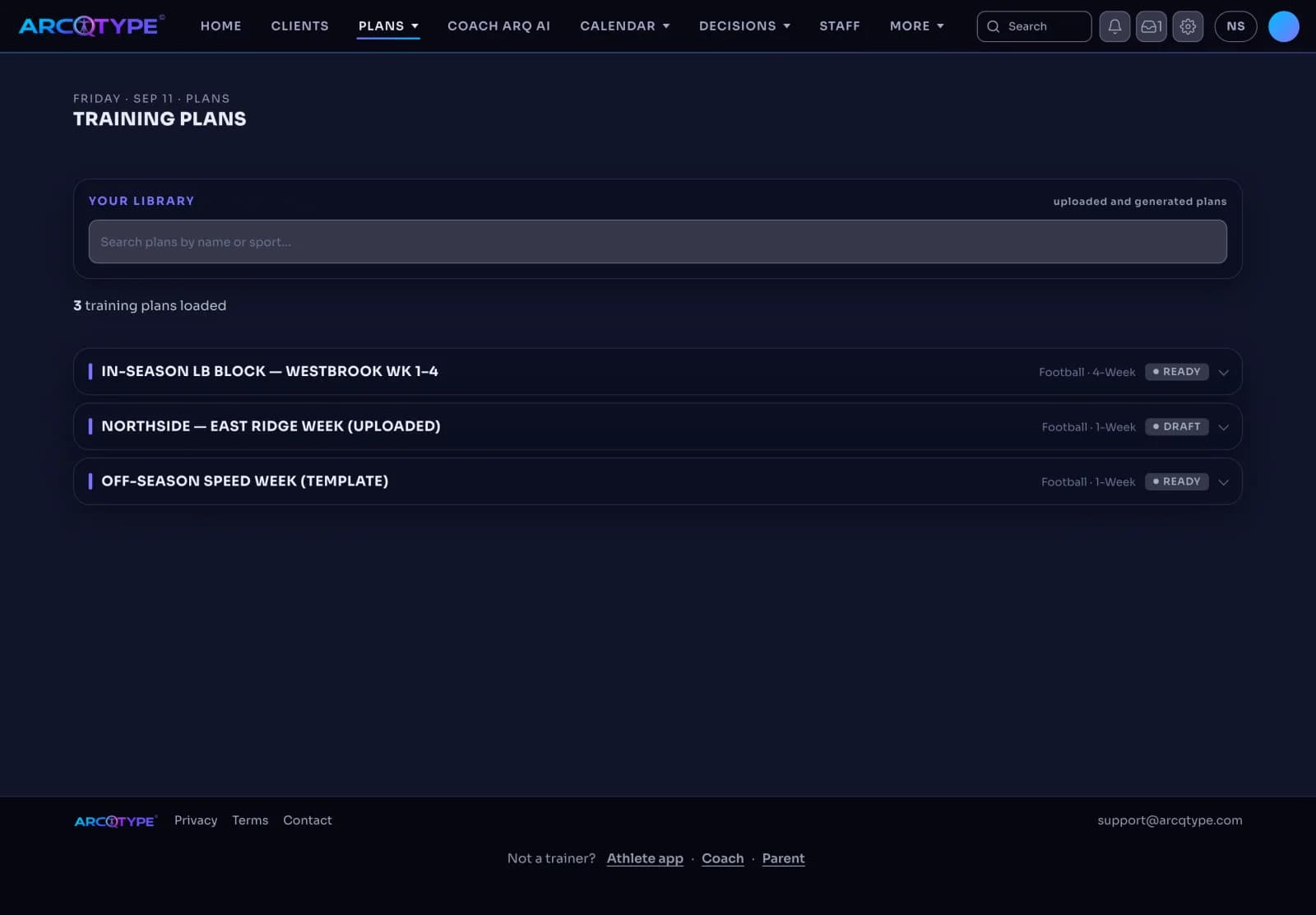
The Trainer website Training Plans library with three plans: In-Season LB Block, a four-week football plan marked ready; an uploaded one-week Northside East Ridge week in draft; and an Off-Season Speed Week template marked ready.
Coming soon, fall 2026.

Trainer website · Training Plans

Build from your existing plans

Adapt your training material for a linked athlete.

  • Preview a PDF, Word, or Excel import before saving.
  • Edit weeks, days, exercises, sets, and reps in a versioned plan.
  • Activating a new plan retires the prior assignment for that athlete.
  • Browse sport templates as read-only references.

Trainer website · Calendar and Sessions

Your floor. Your schedule. Your clients.

Follow client sessions from check-in to saved log.

  • Scan scheduled client sessions by time and location.
  • Track explicit session states from Scheduled through Logged or Cancelled.
  • Save session notes, duration, and RPE.
  • Exchange session calendars through .ics import and export.

Trainer website · Coach ARQ AI and Inbox

Coach ARQ AI for client planning

Prepare client work from trainer-owned context.

  • Ask Coach ARQ AI to build a four-week training block for a linked client.
  • Use athlete-consented readiness without exposing raw health inputs.
  • Review proposed sessions in Decisions.
  • Open an existing Inbox conversation to read and reply.

Coach ARQ AI is ARCQTYPE’s built-in AI chatbot. It helps athletes organize plans, understand their information, and prepare approved updates, working alongside their human coach.

Trainer website · Socials · Preview

Follow client activity inside your gym’s feed.

Socials on the Trainer website shows the activity your linked clients share with you: session completions, posts from the feed, and achievements, beside the plan you assigned.

  • Client activity in the feed: completed workouts, verified PRs, and challenge results from linked clients, newest first, with likes and hashtags.
  • Session completions: a session you scheduled shows as completed when the athlete logs it, so the feed and the assigned plan agree.
  • Achievements: a milestone a client earns shows beside their record, so a PR you coached is visible with its source attached.
  • Verified-only numbers: a lift or PR shows a number only after ARCQTYPE has verified it; everything else reads Pending.
  • No reposts: a post stays with its author and is never re-shared into someone else’s feed, your gym’s included.
  • Private by default: a client’s activity reaches your feed only through the sharing the athlete, and for 13–17 a guardian, turns on.
How Socials works

Trainer website · Calendar

Schedule sessions

Book a session for a linked client; it appears in the athlete’s Calendar and Today and in the Parent calendar.

  • Scan the day’s client sessions by time and location.
  • Track each session from Scheduled through Logged or Cancelled.
  • Save notes, duration, and RPE when the session is logged.
  • Exchange session calendars through .ics import and export.

Trainer website · Plans

Assign the plans you already use

Import a PDF, Word, or Excel plan, edit it week by week, and deliver it to the athlete’s Pathway.

  • Preview the import before saving; weeks, days, exercises, sets, and reps stay editable afterward.
  • Every plan is versioned; activating a new one retires the prior assignment for that athlete.
  • Mark a plan ready or keep it in draft; sport templates stay read-only references.

Trainer website · Clients

Read client training habits

Shared activity and streaks beside the assigned plan, with consent-hidden data kept distinct from zero activity.

  • Training logged days show active and best streaks over 30 days.
  • Nutrition and physical therapy are read against their own denominators, not the training plan.
  • Compare shared activity with the assignment without treating it as plan-specific adherence.
  • A client who has not shared a signal shows as hidden, never as inactive.
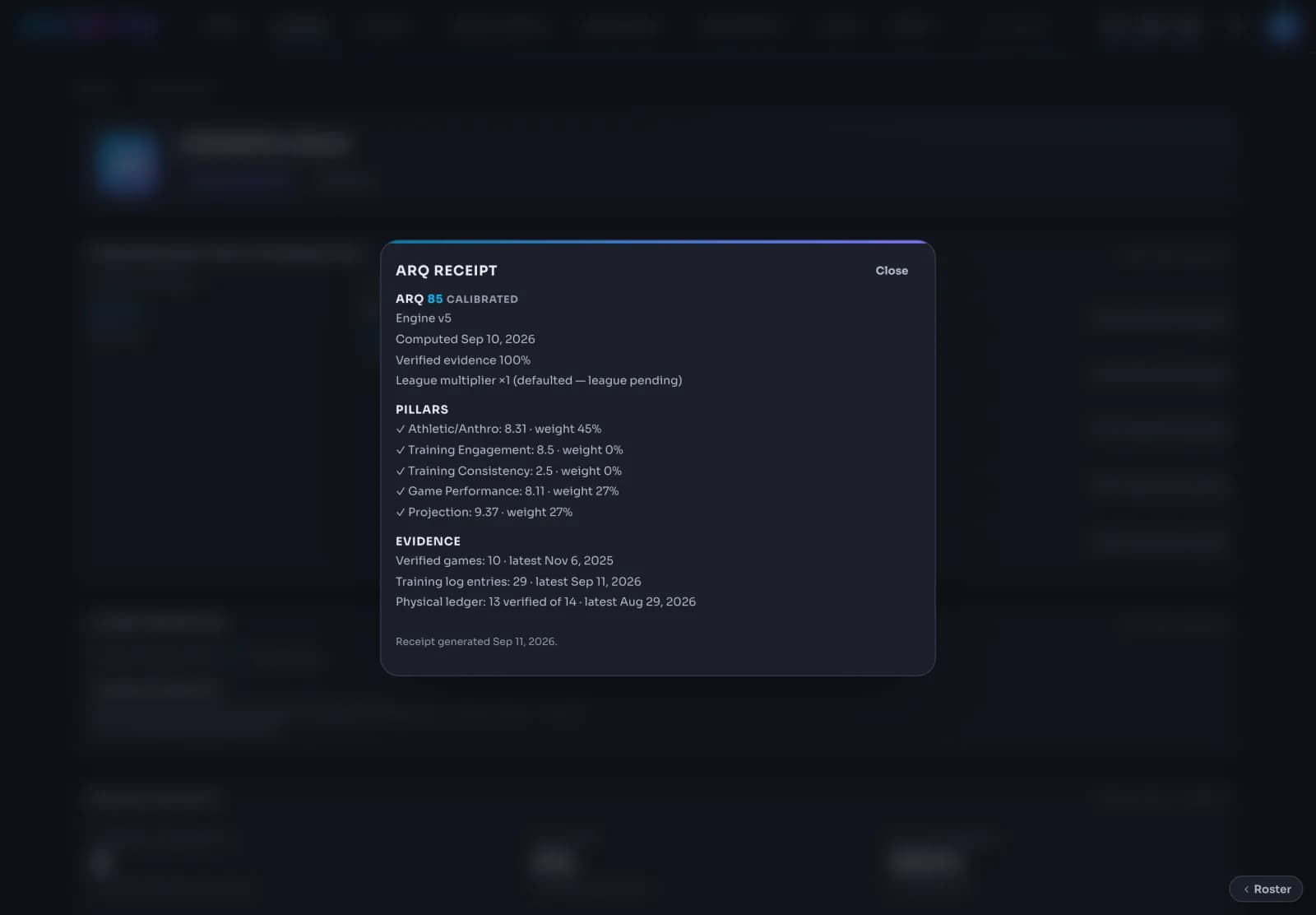
An ARQ receipt opened over the Trainer website client page: ARQ 85 calibrated, engine v5, computed Sep 10, 2026, verified evidence 100 percent, league multiplier pending; five pillars with their scores and weights; and the evidence behind it: verified games, training log entries, and the physical ledger.
Coming soon, fall 2026.

Trainer website · ARQ Score

Keep assigned work separate from evidence

Assigned sessions organize the work. Only separately verified results support the ARQ Score.

  • A logged session counts as work done; it does not raise the ARQ Score on its own.
  • The client page shows the current ARQ Score with its calibration and the verified evidence behind it.
  • The Position Score shows how much of its ladder is verified, so open evidence is visible.

Trainer access & pricing

Keep the client workflow connected.

Public access opens in stages. The roster and session workflow stay connected around the athlete.

Trainer access$24 monthly · $249 annualpublic waitlist open* Eligible Trainer results count toward the ARQ Score only after separate verification.
What are you interested in?

Joining the waitlist saves your email for Trainer launch updates—it doesn’t create a client link.